
Run a one-week inventory sprint: list every tool, its owner, cost, and where it stores customer data. That single move unlocks everything else in a martech stack audit because it exposes the redundant seats, dead integrations, and unowned tools quietly draining budget. Gartner reports that only about 49% of marketing technology capabilities get actively used, so most teams are paying twice for half the value. Specialized intelligence platforms can compress the data collection part of that sprint from weeks to days.
TL;DR:
- Running a one-week inventory sprint identifies unused licenses, dead integrations, and unowned tools that drain budgets unnecessarily.
- Most teams wait until renewal notices to audit, but early signals like low usage or data mismatches can prevent paying for ineffective tools.
- Prioritizing tools based on impact versus effort, and validating data exports before migration, reduces risks and speeds up the audit process.
- AI readiness assessments must include API access and data export capabilities, as these are crucial for future automation and AI initiatives.
- Governance practices such as purchase gates and clear ownership prevent political protectors from maintaining underperforming or redundant tools.
Table of Contents
- What Is a Martech Stack Audit and Why It Matters in 2026
- When Should You Run a Martech Stack Audit?
- How Do You Actually Audit a Martech Stack?
- Which Tools Should You Keep, Kill, or Combine?
- How Do You Check Integration Health and System of Record Accuracy?
- What Does a 30-60-90 Day Audit Roadmap Look Like?
- Why AI Readiness Changes How You Score Tools in 2026
- The Politics Problem Nobody Talks About in Martech Audits
- Speed Up Your Next Martech Stack Audit With Prowl Agent
- Sources
- FAQ
What Is a Martech Stack Audit and Why It Matters in 2026
A martech stack audit is a structured review of every marketing tool your team pays for, measured against actual usage, integration health, and cost. It answers three questions: what are we paying for, who is using it, and is it still earning its place. Unlike a casual “let’s see what we have” spreadsheet exercise, a real audit produces a scored inventory that finance and IT can act on.
The reason this matters right now isn’t abstract. Gartner’s utilization data on martech capabilities means roughly half of every dollar spent on marketing software goes toward features nobody opens. That’s not a rounding error at renewal time. An audit converts that waste into a specific action list: cancel this, consolidate that, renegotiate this contract before it auto-renews.
Measurable benefits show up fast once you start tracking the right numbers:
- Cost reduction — duplicate licenses and shelfware get identified and cut, often within the first pass.
- Better data quality — mapping which tool is the system of record for each data type eliminates conflicting customer profiles.
- Faster insight generation — fewer disconnected tools means less manual exporting and reconciling before a report goes out.
- Governance clarity — someone finally owns each tool, so nothing gets renewed on autopilot.
Track utilization metrics such as logins and feature use, total cost of ownership including implementation and training efforts, integration count per tool, and data consistency between related systems. Those four metrics turn a subjective “do we still need this” conversation into a data backed decision.
When Should You Run a Martech Stack Audit?
Most teams wait too long, usually until a renewal notice forces the question. By then you’ve already paid for another year of a tool nobody logs into. Watch for signals instead of waiting for the invoice, such as data mismatches across reports, very low usage on tools, multiple tools serving the same function, upcoming contract renewals, or major organizational changes like growth phases or mergers.
A full audit once a year is the baseline for most mid-size marketing teams, with lighter quarterly checks on usage and spend in between. Companies in active growth or post-acquisition integration should tighten that to twice a year. Ownership matters as much as cadence: Finance should flag renewal windows, RevOps should own the usage data, and IT should sign off on anything touching integrations or data security, ideally against a framework like ISO/IEC 27001 for governance controls.
How Do You Actually Audit a Martech Stack?
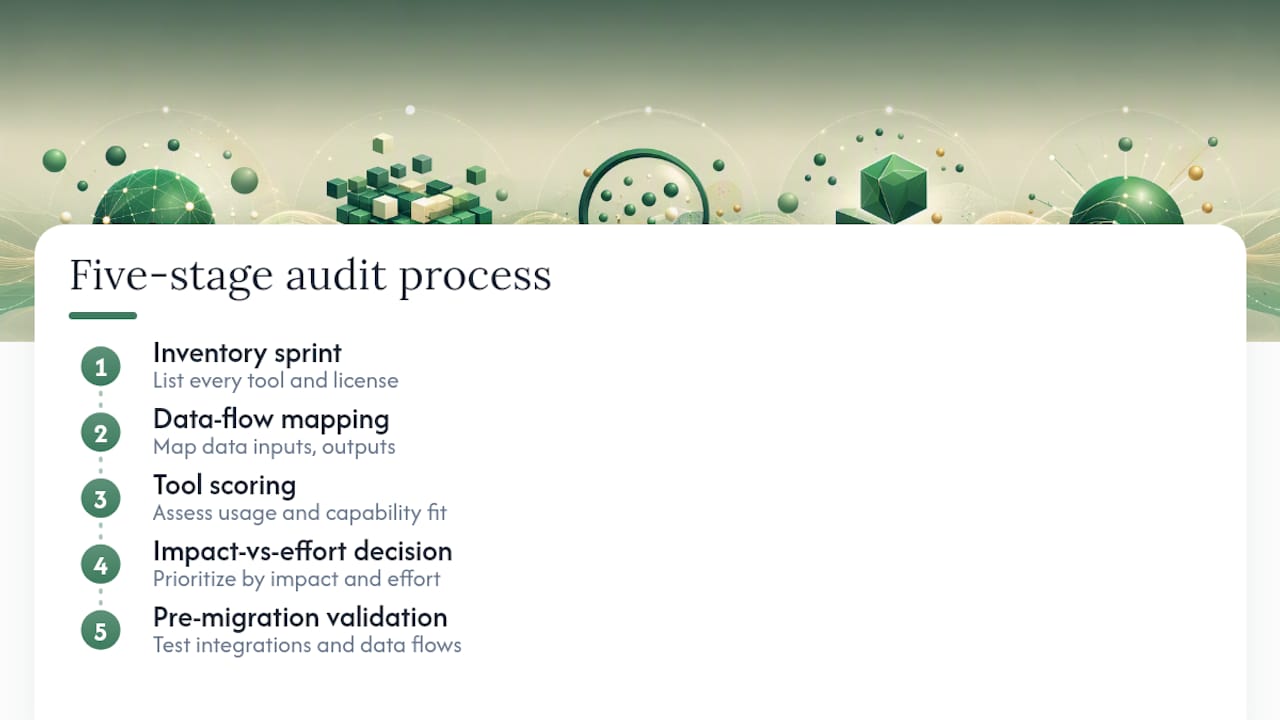
The process breaks into five stages, and skipping any one of them is how audits stall out in a spreadsheet nobody finishes. This is the operational core of the whole exercise.
Step 1: Run the inventory sprint
Allocate a focused period to capture for every tool: owner, active user count, licensed seats, annual cost, contract renewal date, integration points, and data destinations. This is tedious but non-negotiable. Practical audit frameworks consistently point to this inventory step as the foundation everything else depends on.
Pull the list from three places: your finance team’s software spend report, your single sign-on admin panel (which shows real login activity, not what people claim to use), and a straight survey to team leads asking what they touch weekly. Cross reference all three. The gaps between them are often more revealing than the tools themselves.
Step 2: Map the data flows
For each tool, trace where its data comes from and where it goes. Which platform is the system of record for customer email addresses? For deal stage? For campaign attribution? If two tools both claim to be authoritative for the same field, you have a parity problem that will eventually cause a public reporting error.
Check sync frequency (real time versus nightly batch) and spot check actual records to confirm the numbers match across systems. HubSpot’s operational research on audit checklists backs this up: broken or one way integrations are one of the most common findings in a thorough review, and they’re rarely visible until someone actually goes looking.
Step 3: Score every tool
Create a scoring rubric with dimensions such as business value, adoption level, integration quality, total cost of ownership, and AI readiness. Tools scoring highly are worth keeping; those scoring poorly in adoption and integration merit retirement consideration. Multi-dimension scoring like this turns a political conversation (“but marketing loves this tool”) into a numbers conversation.
Pro Tip: Score AI readiness separately from general usefulness. A tool can be beloved by its daily users and still be a liability if it locks data behind a closed interface with no exportable API. That gap only gets more expensive as more of your workflow depends on AI agents pulling from connected data.

Step 4: Decide, using a simple matrix
Plot each tool on impact versus effort to change. High impact, low effort tools get kept as is. Low impact, low effort tools get killed immediately. High impact, high effort tools (usually your CRM or core automation platform) get a careful migration plan, not a snap decision. Low impact, high effort tools get flagged for a longer term phase out rather than a disruptive rip and replace.
Risk assessment belongs in this step too. Ask what breaks downstream if you kill a tool: does a reporting dashboard depend on it, does a webhook feed another system, does a sales team rely on a field it populates? Answering that before you cancel anything prevents the kind of surprise outage that makes stakeholders distrust the entire audit process.
Step 5: Validate before you migrate
Before retiring or replacing anything, confirm you can actually get the data out. Check export formats, whether historical records come with the export or only current state, and whether the vendor throttles bulk exports. Build a rollback plan for anything touching revenue reporting or customer records, even if you’re confident in the migration. Migrations that skip validation are the single biggest source of audit related fire drills.
Which Tools Should You Keep, Kill, or Combine?
Scoring gives you numbers. Turning those numbers into decisions still requires judgment, especially when a tool has a vocal internal fan base.
Keep tools that hold decision grade data (the kind finance or the executive team actually references), show a clear ROI signal, and integrate cleanly into your core systems. A tool that scores high on business value but low on integration is worth a fix attempt before a keep decision, not an automatic pass.
Kill tools with narrow, niche adoption, capability that duplicates something else in the stack, integrations that have been broken for more than a quarter, or a total cost of ownership that’s outsized relative to what it delivers. If nobody can name a specific outcome the tool produced in the last two quarters, that’s usually your answer.
- Combine when it reduces complexity, not just headcount of tools — consolidating into a platform of record works for core functions like CRM or CDP.
- Use API orchestration instead of forced consolidation for specialized tools that do one thing well and expose clean data access.
- Communicate sunset timelines at least 60 days out, with a named replacement workflow, not just a cancellation date.
- Assign one person to own the change management conversation per tool, so users have a single point of contact instead of a vague announcement.
Sunsetting a tool without a communication plan is how audits earn a bad reputation internally. People don’t resent losing a tool nearly as much as they resent losing it without warning.
How Do You Check Integration Health and System of Record Accuracy?
Integration problems hide well because dashboards on both ends often look fine even when the data behind them has drifted apart. A few concrete checks catch what a glance won’t.
- Verify sync frequency against your actual needs — a nightly batch sync feeding a dashboard your sales team checks hourly is a silent source of bad decisions.
- Spot check records on both sides of an integration — pull ten customer records from each connected system and confirm the key fields match.
- Look for stale webhooks — a webhook that hasn’t fired in 30 days despite ongoing activity usually means a silent failure, not zero events.
- Flag one way exports — if data only flows out of a tool and nothing flows back, that tool can’t participate in a unified customer view no matter how good its own reporting looks.
- Check for missing unique IDs — records without a consistent identifier across systems are the root cause of most manual reconciliation work.
Pro Tip: Ask each vendor directly for their API rate limits and webhook reliability history before you commit to keeping a too long term. A platform with a great interface but a throttled, unreliable API will become the bottleneck the moment you try to connect it to anything else.
Document which system is the system of record for each core data type (customer identity, deal stage, campaign attribution, consent status) in a single shared reference. When two tools disagree, the system of record wins by definition, and everything else gets flagged for correction rather than treated as a coin flip.
What Does a 30-60-90 Day Audit Roadmap Look Like?
Findings without a sequence turn into a report nobody executes. A phased roadmap keeps momentum and shows measurable progress at each checkpoint.
- Days 0 to 30: Finish the full inventory and scoring pass. Cancel the obvious low-risk licenses (unused seats, expired pilots) immediately. Fix the one or two most damaging broken integrations. KPI: number of licenses cancelled and dollar amount recovered.
- Days 30 to 60: Execute the low-friction migrations identified in the decision matrix. Begin consolidating the clearest overlapping tools, starting with the pair causing the most reporting confusion. KPI: number of tools consolidated and integration parity restored.
- Days 60 to 90: Tackle the higher-risk migrations that touch core systems like CRM or the CDP. Put governance in place, including a purchase approval gate for new tools. Launch adoption campaigns for tools that scored well but had low usage due to poor onboarding. KPI: adoption rate change and governance policy adoption.
Report progress to stakeholders at each 30 day mark with the specific dollar figure recovered and the specific risk retired, not a vague status update. Phased consolidation with visible quick wins builds the internal credibility you need for the harder migrations in the back half of the plan.
Why AI Readiness Changes How You Score Tools in 2026
AI agents can only act on data they can actually reach. A tool that keeps customer history locked behind a closed interface with no usable API isn’t just inconvenient anymore, it’s a blocker for any AI initiative built on top of your stack. Industry coverage of the 2026 consolidation wave points directly at this: platforms that can’t expose data and actions cleanly to an orchestration layer are becoming the first candidates for replacement, regardless of how well they perform their original job.
Build an AI readiness checklist into your scoring rubric: does the tool offer a documented API, can it return a complete and current customer profile on demand, does it support explainable outputs rather than a black box result, and does it have governance controls that let you audit what an agent actually did. Where lock-in is a risk, favor vendors with clear data export rights and standard authentication, and keep a documented exit plan for any tool holding data critical to AI workflows.
Nearly half of martech capabilities go unused — Gartner’s data on the roughly 49% utilization rate is the clearest evidence that most stacks are carrying dead weight long before AI even enters the conversation.
The Politics Problem Nobody Talks About in Martech Audits
The technical part of an audit is the easy part. The hard part is that every redundant tool has a defender somewhere in the org, and the defense is almost never about the tool’s actual performance. It’s about who championed the purchase or who’s comfortable with the interface.
The three failures I see most often: politics protecting a tool that scored poorly on every rubric, migrations that get approved but never actually tested before cutover, and no purchase gate, so a “temporary” tool from a departed employee is still on the books two years later. None of these are technical problems. They’re governance problems.
The fixes are unglamorous but they work: a central purchase gate that requires a scoring sheet before any new tool gets approved, a quarterly health check that revisits usage numbers instead of waiting a full year, and one named owner for stack governance who isn’t also the person championing half the tools under review. Work pulling cross-tool intelligence for agencies and analysts makes one thing obvious: the teams that keep their stacks lean are the ones who treat governance as a repeatable process, not a once-a-year fire drill.
— Sergey
Speed Up Your Next Martech Stack Audit With Prowl Agent
The slowest part of any martech stack audit isn’t the decision-making, it’s gathering the evidence: pulling usage numbers, checking integration health, and comparing tools feature by feature across a dozen different dashboards. Some platforms provide a single connector to hundreds of intelligence tools instead of multiple separate logins, so the inventory and scoring work that normally eats a full week can compress into days.

A focused pilot works well here: connect Prowl to your agent workflow and run an inventory plus integration check report on your current stack before your next renewal deadline. The use cases page walks through how the connector handles competitor and tool comparisons, and Getting Started covers what it takes to connect Prowl to whatever agent or workflow your team already uses. If you’re evaluating vendors as part of a hiring or contractor decision alongside the audit, this evaluation framework for performance marketers is worth a look too. Run the pilot on one function, like SEO or ad performance tracking, and see how much faster the evidence comes together.
Sources
- Gartner — Marketing technology
- CMSWire — Can your martech stack support AI agents or is it just in the way?
- MarketingOps — Marketing Tech Stack Audit Guide for Marketing Operations
- HubSpot — Marketing operations tech stack audit checklist
- ISO — ISO/IEC 27001
FAQ
What Is a Martech Audit?
A martech audit is a structured review of every marketing tool a team pays for, scored against usage, integration quality, and cost to decide what to keep, cut, or combine.
What Does Martech Stack Mean?
A martech stack is the full collection of software a marketing team uses to run campaigns, manage customer data, and measure performance, from CRM and email platforms to analytics and ad tools.
How Do You Build a Martech Stack?
Start by mapping the core functions you need (CRM, automation, analytics, content), pick one system of record for customer data, and add tools only when they integrate cleanly with what you already have. Certain platforms can help evaluate tool coverage and overlap before you add anything new.
What Is an Example of Martech?
A CRM platform, an email marketing tool, a marketing automation system, and an analytics dashboard are all examples of martech, along with connector platforms that pull intelligence across multiple tools at once.