
AI agent integrations connect a model to the APIs, databases, files, and tools it needs to retrieve real information and take real actions, instead of guessing from training data alone. The right approach depends on your latency budget, data sensitivity, and how much operational maturity your team actually has, not on which pattern sounds most impressive. Start with a scoped pilot using two or three tools. The engineering around retrieval, guardrails, and monitoring will consume far more of your time than picking a model.
TL;DR:
- Integrating AI agents with real data sources requires managing complex authentication, schema validation, and maintenance across multiple APIs, databases, and file stores.
- Pattern choice depends on latency, data sensitivity, and team maturity, with RAG and augmented workflows recommended before considering autonomous agents.
- Using platforms like Prowl MCP simplifies integration by providing a single API for hundreds of market intelligence tools, reducing development and maintenance effort.
- Early investment in evaluation, observability, and monitoring is crucial to prevent costly failures and ensure reliable agent performance in production.
- Teams should start small with scope, build a curated set of test cases, and plan for ongoing upkeep and adjustments, especially for production-grade deployments.
Table of Contents
- Why AI Agent Integrations Matter for Knowledge and Action
- What Data Sources Do AI Agents Typically Connect To?
- Which Integration Architecture Pattern Fits Your Project?
- Key Features to Look for in an Integration Platform
- Best Practices for Building and Operating Agent Integrations
- What Does It Cost to Build and Staff an AI Agent Integration?
- How Prowl Simplifies Market Intelligence Agent Integrations
- What Developers Consistently Get Wrong About Agent Integrations
- Get Your Agents Connected to Real Market Data With Prowl
- Sources
Why AI Agent Integrations Matter for Knowledge and Action
A language model without integrations is a very well-read stranger. It can reason about your business, but it doesn’t know your customer’s ticket history, can’t check today’s inventory, and has no way to actually cancel that subscription you’re asking it to cancel. Integrations close both gaps at once: they give the model current knowledge and let it perform actions with consequences.
Split the problem into two roles. The knowledge role covers retrieval-augmented generation (RAG): pulling relevant documents, embeddings, or records into context so the model answers with facts instead of plausible fiction. The action role covers tool calls and API invocations, where the model outputs structured commands that your code executes deterministically. A support agent that reads a knowledge base is doing retrieval. A support agent that issues a refund is doing action. Most production systems need both, and conflating them is a common design mistake.
Deterministic execution matters more than it sounds. The model decides what to call and with what arguments, but your integration layer decides whether that call is safe to run, validates the schema, and executes it the same way every time. That separation is what keeps an agent from becoming unpredictable.
A few production patterns show the value clearly:
- A sales agent that queries a CRM through a tool call, then drafts a follow-up email grounded in the actual deal stage rather than a hallucinated one.
- A support bot that retrieves policy documents via RAG before answering a billing question, cutting wrong-answer escalations.
- An operations agent that writes structured updates back into a database after confirming a threshold, rather than just describing what it would do.
None of these require a fully autonomous system. They require a model connected to the right data source and the right action, with clear boundaries around what it’s allowed to touch. That’s the entire premise of AI agent integrations: extend a capable but isolated model into something that can see your systems and touch them safely.
What Data Sources Do AI Agents Typically Connect To?
Every integration project eventually runs into the same inventory of sources, and each one carries its own engineering tax. Knowing the categories upfront saves you from discovering the hard parts mid-build.
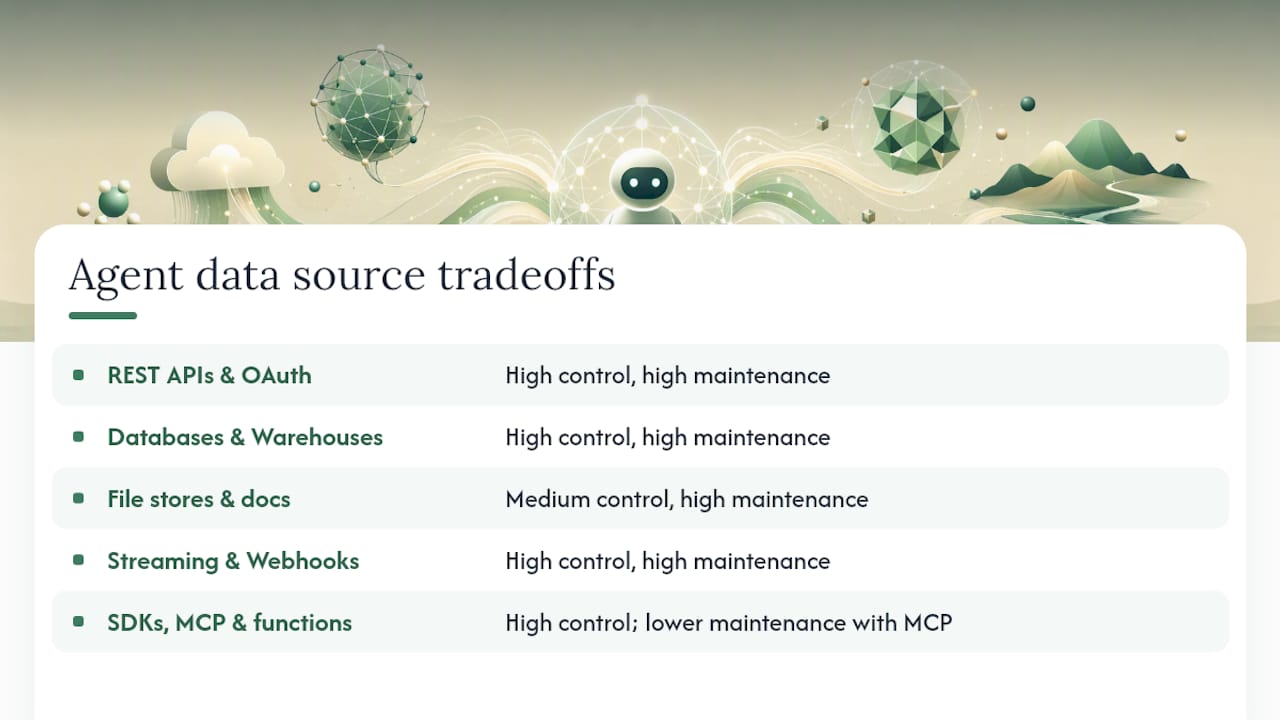
REST APIs and OAuth-protected SaaS make up the bulk of enterprise integrations: CRMs, HRIS platforms, payment processors. The technical challenge isn’t the API call itself, it’s managing OAuth tokens per customer, handling refresh cycles, and dealing with rate limits that vary by vendor tier. Enterprise agent projects commonly need connectors spanning CRM, ATS/HRIS, storage, and streaming systems simultaneously, and each one needs its own auth lifecycle.
Databases, replicas, and warehouses feed both structured queries and embedding pipelines. Smart teams query a read replica rather than production, and they pre-compute embeddings into a vector store rather than generating them on every request. Skipping this step is the single most common cause of an agent that feels slow.
File stores and unstructured documents (Google Drive, Notion, PDFs, Confluence) require an ingestion pipeline: extraction, chunking, and re-indexing whenever the source changes. This is the least glamorous integration work and the most frequently underestimated.
Streaming sources and webhooks support agents that need to react in near real time, order status changes, inventory drops, support ticket creation, rather than polling on a schedule. Webhooks reduce latency but add a new failure mode: your endpoint has to handle retries and out-of-order delivery.
SDKs, function-calling tools, and MCP servers give developers the most direct control over what an agent can do. The Model Context Protocol has emerged as a way to normalize tool interfaces across many SaaS platforms, handling auth, pagination, and response transformation so you’re not writing a bespoke adapter for every vendor. Unified APIs paired with MCP support are becoming a default architecture for agents that need to act across dozens of systems rather than one.
The tradeoff across all five categories is consistent: more direct access means more control and more maintenance burden. Less direct access (via a unified API or MCP layer) means faster setup but less flexibility for edge cases.
Which Integration Architecture Pattern Fits Your Project?
Five patterns cover nearly every real-world agent integration, and the right one depends on latency tolerance, data sensitivity, budget, and how mature your team’s operations already are. Picking the wrong pattern is the fastest way to burn a quarter on a project that should have taken six weeks.
The API wrapper pattern bolts a model onto an existing endpoint, useful for adding a summarization or classification layer without touching core infrastructure. The AI microservice pattern isolates model logic in its own service with its own deploy cycle, which is the right call when the AI component needs independent scaling or a different release cadence than the rest of your stack. RAG over your data is the workhorse pattern for knowledge-heavy use cases: support, internal search, document Q&A. Embedded in-app assistants live inside your existing product UI and typically call a narrow set of tools scoped to that surface. Event-driven enrichment triggers model calls off a queue or webhook, good for background classification, tagging, or alerting where the user isn’t waiting on a response.
Autonomous agents deserve a separate warning. They’re the highest-risk pattern on this list. They require longer build timelines, often several months, and they only make sense when multi-step planning is genuinely required and the cost of a wrong action stays bounded. If a human can review the output before anything ships, you probably don’t need full autonomy yet.
For most teams, the sane order of operations is: start with an augmented workflow or a RAG pattern, prove out evals and observability, and only then consider anything more autonomous. Every team that skips this order ends up building the monitoring infrastructure retroactively, under pressure, after something has already gone wrong in production.
Key Features to Look for in an Integration Platform
The platform or SDK you build on determines how much of this work you do yourself versus how much comes solved. A handful of capabilities separate a smooth build from a six-month slog, and several of them rarely get evaluated until they’re missing:
- Multi-tenant auth management, so you’re not hand-rolling OAuth token refresh logic for every customer and every connected app.
- Type-safe tool interfaces with schema validation on inputs and outputs, catching malformed tool calls before they hit a live system.
- Observability and tracing across both model calls and tool calls, so you can see exactly which step in a multi-hop request failed and why.
- Rate-limit handling, retries, and idempotency, since a naive retry on a non-idempotent action (like charging a card twice) is a production incident waiting to happen.
- Circuit breakers that stop calling a failing downstream service instead of hammering it into a longer outage.
- Secrets management and least-privilege scopes, with audit logs recording exactly which agent touched what and when.
- Developer ergonomics, including SDKs, quickstarts, working examples, and MCP support that gets you to a first working call in hours, not days.
OpenAI’s own developer documentation makes a related point worth internalizing: when you decide between a lower-level API and a managed agent loop, the real question is how much of the loop, tool selection, retries, state, you want the framework to own versus your own code. Built-in traces and guardrails matter here specifically because they surface failures at the step level instead of just returning a generic error.
Pro Tip: Before you commit to a platform, run one real tool call through its full auth flow, including token refresh, and check what its trace output looks like when that call fails. That five-minute test reveals more than any feature comparison chart.
Best Practices for Building and Operating Agent Integrations
Most AI integration failures aren’t model failures. They’re scope failures, missing evals, or a monitoring gap that nobody noticed until a customer did. Roughly 80% of what determines success is the engineering around the model, data access, retrieval quality, guardrails, caching, observability, not the model choice itself. That ratio should shape how you allocate your team’s time from day one.
- Lock scope before you write code. Start with two or three tools, not ten. Every additional tool multiplies the ways an agent can go wrong and the surface area you have to test.
- Build a golden set before you ship anything. A curated set of 30 to 150 input/output pairs, tied to your actual task rather than a public benchmark, gives you a repeatable way to catch regressions. Wire that golden set into CI so a prompt change or model swap runs against it automatically, the same way a code change runs against unit tests.
- Instrument production from day one. Log inputs, outputs, latency, and cost per call, along with a way to flag when a human had to correct the agent’s output. That correction rate is often your earliest and most honest signal of real-world accuracy.
- Put a human in the loop for risky actions. Anything with financial, legal, or irreversible consequences should route through an approval step, with an audit trail showing who approved what.
- Treat PII with a minimal-access default. Redact sensitive fields before they reach the model wherever possible, and scope tool permissions to exactly what a task needs, not what might be convenient later.
- Budget for maintenance, not just the build. Plan to spend at least 20% of your initial build cost annually on ongoing evals, prompt tuning, and connector upkeep as upstream APIs change underneath you.
That last point catches teams off guard more than any other line item. An integration isn’t a project with an end date. It’s a system with a maintenance contract, and pretending otherwise is how a working pilot turns into an abandoned one eight months later.
What Does It Cost to Build and Staff an AI Agent Integration?
Planning numbers vary widely by pattern, and vague estimates are worse than useless when you’re pitching a budget internally. Practitioner cost data puts augmented-workflow integrations at costs in the range typical for augmented-workflow integrations, chat or RAG-based features at costs commonly seen for chat or retrieval-augmented generation features, AI-native features built from scratch at costs generally ranging for AI-native feature builds, and fully autonomous agents at costs that can reach six figures or more, depending heavily on scope. Those ranges reflect engineering effort far more than model licensing costs.
A workable core team for a first project looks like this:
- One backend engineer who owns integration plumbing: auth, retries, schema validation.
- One person who owns evals and prompt iteration, ideally someone comfortable reading model outputs critically rather than accepting the first plausible answer.
- One product or domain owner who defines what “correct” actually means for your specific task.
- Part-time security or compliance review, especially once the agent touches customer data or has write access anywhere.
For coordination across these roles, especially once a pilot moves from one engineer’s side project to a team-owned system, treating it as a real operational planning effort rather than an ad hoc arrangement pays off quickly.
Before writing a line of integration code, scope a pilot to a pilot scoped over a few weeks to a few months, instrument it from the start, and measure a baseline (current error rate, current handling time) so you have something concrete to compare against once the agent goes live. Hidden costs to budget for beyond the initial build: connector breakage when an upstream API changes its schema, evals maintenance as your task definition shifts, and the ongoing human review time that a “fully automated” system somehow always still needs.
How Prowl Simplifies Market Intelligence Agent Integrations
Everything covered so far, auth per data source, schema validation, rate limiting, connector maintenance, is the tax you pay for building integrations one API at a time. Prowl removes a large chunk of that tax for a specific and common use case: agents that need market intelligence.
Prowl MCP connects any agent to 448 marketing and competitive intelligence tools through a single API, covering SEO analysis, ad performance tracking, competitor research, review and funnel analysis, and pricing trend data. Instead of writing and maintaining 448 separate connectors, each with its own auth flow and schema quirks, a developer integrates once against the Prowl MCP layer and gets structured access to all of them.
That maps directly onto the RAG and event-driven patterns covered earlier. A research analyst agent can pull competitor pricing changes, generate a structured comparison, and output the result as an interactive report, a PDF, or a slide deck, without a human stitching together five different tools by hand. An agency running weekly SEO audits for clients can trigger that workflow on a schedule instead of rebuilding the query chain manually each time.

The getting-started documentation walks through connecting an agent to the Prowl MCP and running a first query, useful if you want to see the schema and output formats before committing engineering time. The use-cases page shows how teams have mapped Prowl into research-analyst and reporting workflows, which is worth a look if you’re still deciding whether a unified intelligence layer fits your architecture better than building bespoke connectors to a dozen individual tools.
The operational win is the one that matters most once you’re past the pilot: fewer connectors to patch when a vendor changes an API, and a much shorter path from prototype to something a team actually relies on daily.
What Developers Consistently Get Wrong About Agent Integrations
Priority number one: get your evals and observability working before you add your fourth tool, not after your tenth. Teams that skip this almost always end up debugging in production, which is the most expensive place to discover a problem.
Three mistakes show up constantly. First, teams pick the most impressive-sounding pattern (usually a fully autonomous agent) before they’ve proven a simpler workflow can even hit acceptable accuracy. Fix: default to RAG or an augmented workflow, and earn your way up to autonomy. Second, teams treat the golden set as a one-time checklist item instead of a living asset, so regressions slip through silently after a prompt tweak. Fix: wire it into CI and treat a failing eval like a failing test. Third, teams underestimate auth and schema maintenance, assuming a connector built once stays working forever. It doesn’t. Vendors change their APIs without much warning.
If there’s one takeaway worth acting on this week, it’s this: the money you spend on evals and monitoring early is cheaper than the money you’ll spend firefighting later. Every team learns that lesson eventually. The only choice is whether you learn it before or after a customer notices.
— Sergey
Get Your Agents Connected to Real Market Data With Prowl
If your team is weighing whether to build 448 individual connectors or integrate against one unified layer, that decision usually settles itself once you price out the maintenance side. Prowl gives any agent one API connection to 448 market-intelligence tools, covering SEO, ad performance, competitor tracking, and pricing research, and returns results as ready-to-use reports, PDFs, slide decks, or even video and audio summaries.
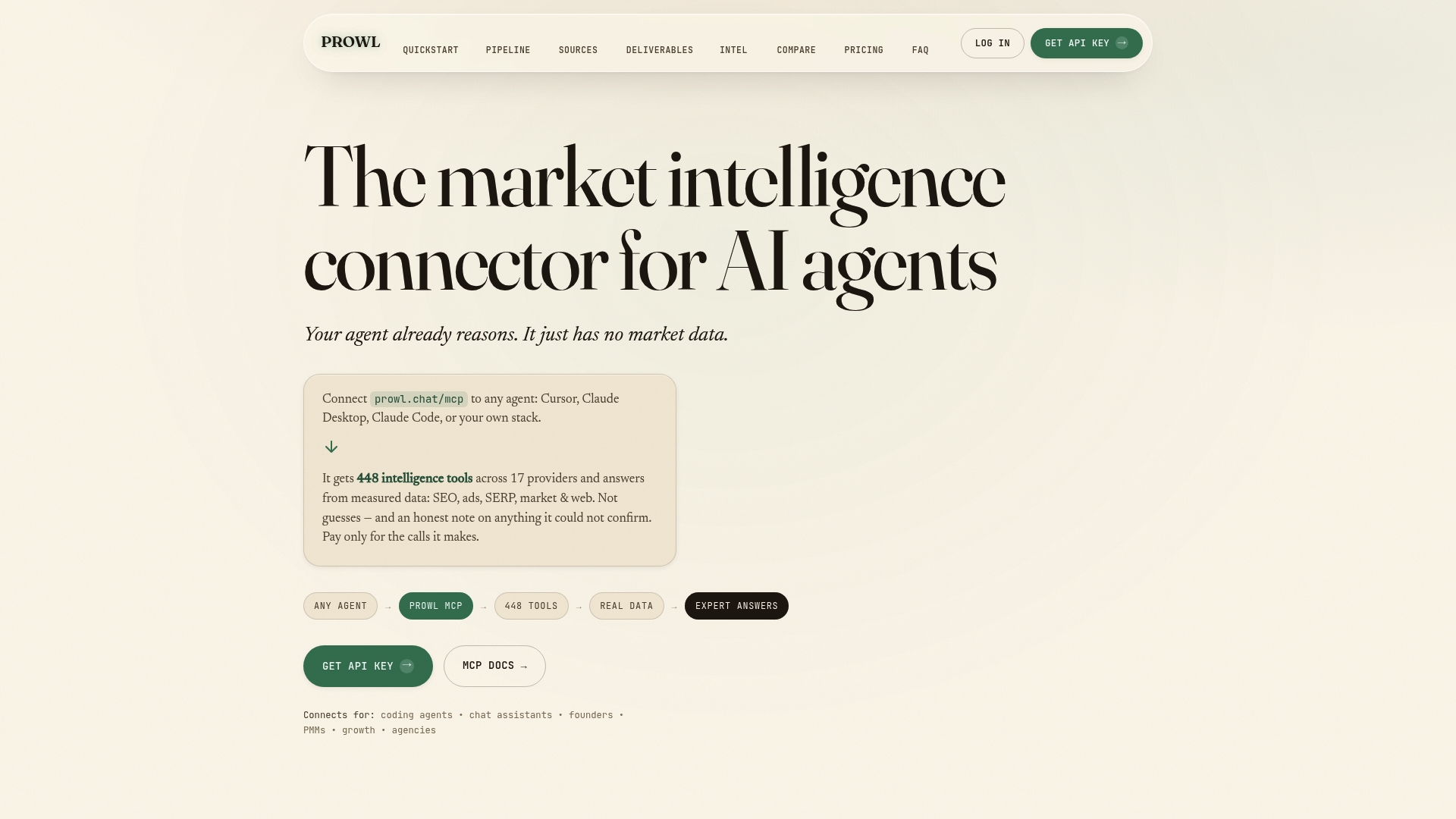
Teams best suited to this are agencies running recurring client reports, business analysts who need fast competitive snapshots, and product teams building research-analyst agents without wanting to own dozens of API keys and rate limits themselves. Rather than scoping a six-month build for market data connectors, you can prototype against live data the same week.
Head to Prowl’s platform overview to see the full tool catalog, or jump straight to the getting-started guide to connect your first agent and run a query today.
Sources
The Design Key practitioner guide is the strongest source here for realistic cost ranges, timelines, and the engineering-first framing that shapes most of this article’s operational advice.
For architecture decisions, Zealousys’s breakdown of integration patterns and Knit’s overview of MCP and unified APIs both cover the tradeoffs between building direct connectors and adopting a normalized integration layer.
For platform evaluation and SDK-level decisions, Nango’s rundown of platform capabilities and OpenAI’s own agents documentation are worth reading before you commit to a specific tool loop or managed SDK.
- AI Integration for Business: Practitioner Guide | Design Key
- How to Integrate AI Into Existing Software (Without a Rebuild)
- Integrations for AI Agents | Knit (blog)
- Best AI agent integration platforms to consider in 2026 | Nango